Indoor cycling · in your browser
Structured training on a road worth riding.
Connect your smart trainer, pick a workout and ride it in ERG mode through Silverhorn Pass, a hand-built alpine world. Your rider pedals at your cadence, and other riders keep you company along the way.
- No install
- No account needed
- Rides stay on your device

What is wattstrada?
A training app that feels like a ride outside.
wattstrada turns a structured workout into a ride through the mountains.
Your smart trainer holds the exact power each interval asks for, so you only have to pedal. On screen, your low-poly cyclist rides laps of Silverhorn Pass: a 24.5 km loop past Mirror Lake, through the Snowpine Forest and over snowy hairpins.
Your speed comes from your real power and the road's grade. Bots ride alongside you, and a ghost of your best previous attempt shows whether you're ahead of it.
How it works
From the couch to the climb in four steps.
Pick your rider
Add your name, FTP and weight. Several people can share one device, each with their own profile.
Connect your trainer
Pair your smart trainer over Bluetooth, and a heart-rate strap or cadence sensor if you have one.
Choose a workout
Pick from 100 wattstrada workouts, search the TrainerDay catalog, or import your own.
Ride
ERG mode sets the resistance for every interval. Or choose a free ride and let the road's gradient set it.
Features
Everything you need for a good session.
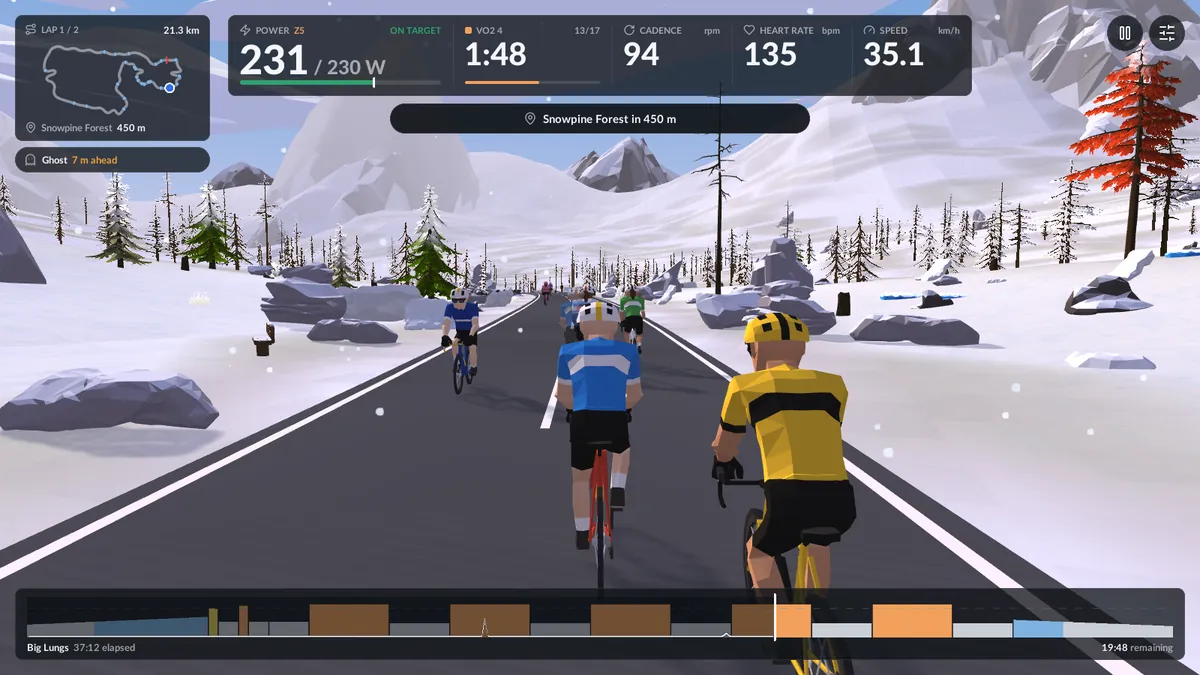
A clear ride screen
Everything you need at a glance, on a laptop, tablet or phone:
- power against target, with your current zone
- the interval timer, plus what comes next
- cadence, heart rate and speed
- the whole workout profile along the bottom
Need another minute? Extend the interval with one tap.
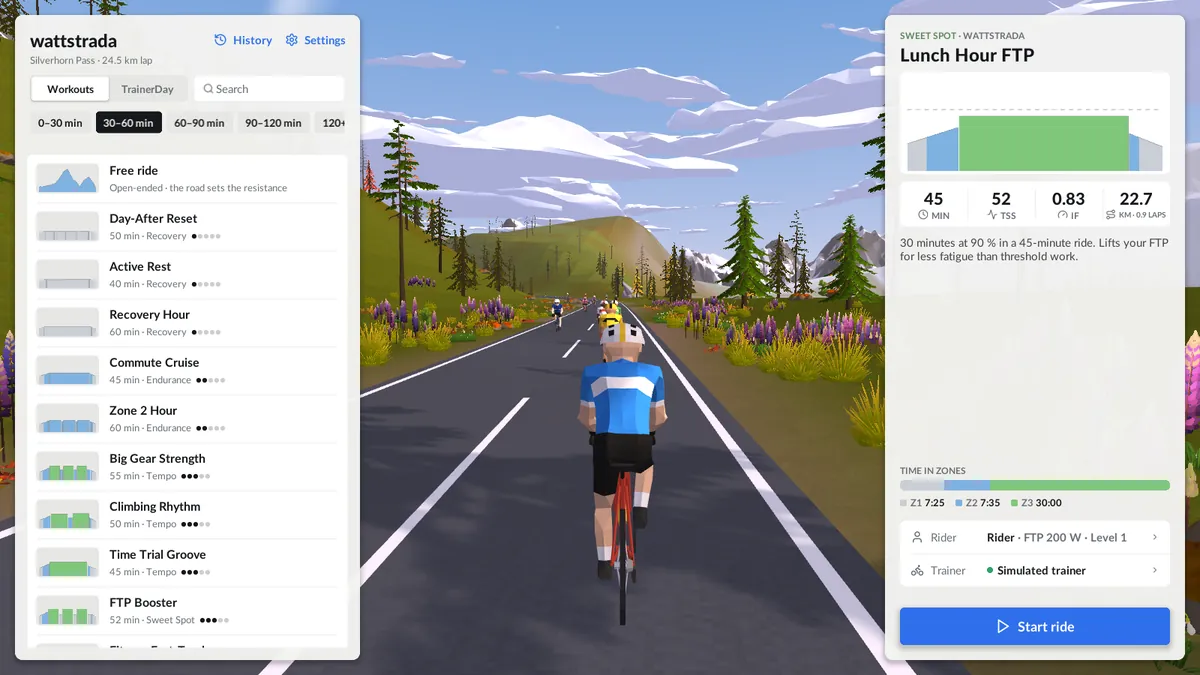
100 workouts, each with a purpose
The wattstrada catalog covers everything from easy recovery spins to VO2 max intervals, sorted by duration. Each workout says what it trains and shows its TSS, intensity and time in each zone before you start.
Want more? Search the TrainerDay community catalog, or import .zwo, .erg and .mrc files.
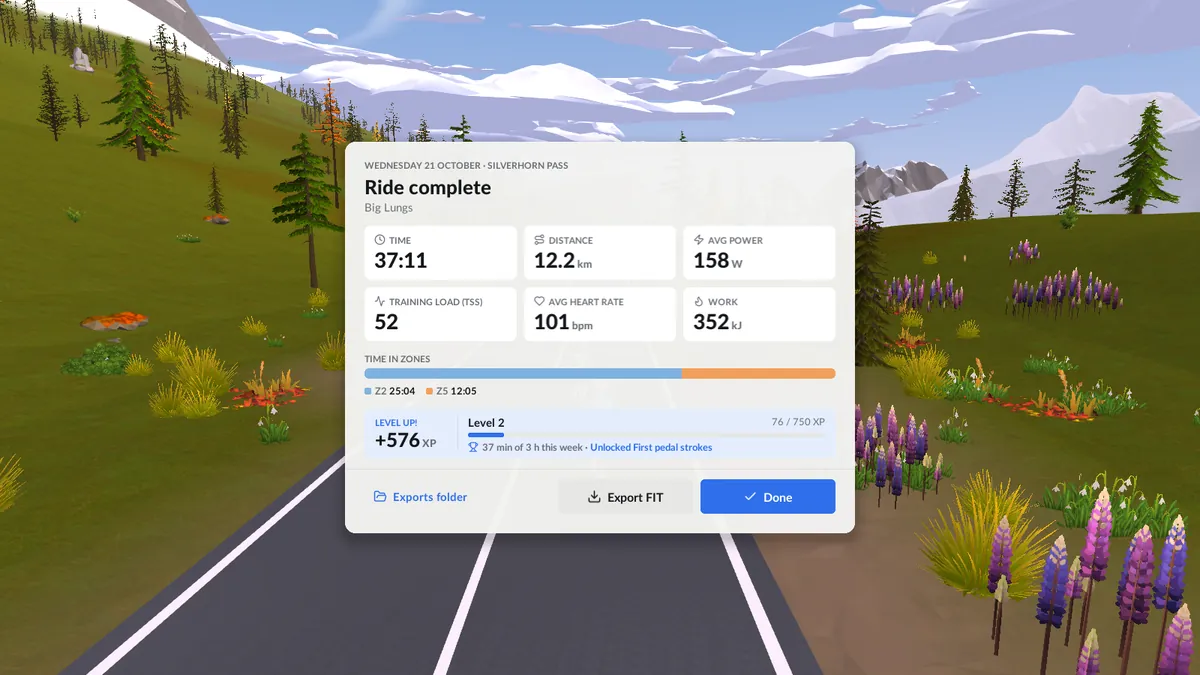
Your ride, your data
Every ride is recorded once a second. Afterwards you get time, distance, power, TSS, heart rate and time in zones.
Export a standard .fit file to upload to your training log of choice. It includes GPS points along the route.
FTP ramp test
Don't know your FTP? The built-in ramp test ends by itself and suggests a new value, which you can save with one tap.
XP, levels and goals
Earn XP on every ride, level up, set a weekly goal and collect achievements along the way.
Ghost and bots
Race your own best attempt at a workout and ride with a small group of bots, so the road never feels empty.
Free ride
No plan today? Ride the loop on your own terms. The climbs and descents set the resistance.
Optional sync
Want your rides on more than one device? Link a profile by sending one email. There's no password to remember.
Light and dark
Menus and the ride screen come in light and dark, and adapt to computers, tablets and phones.
What you need
A smart trainer and a browser.
wattstrada uses Bluetooth to talk to your trainer. It speaks FTMS, Tacx FE-C and Wahoo's protocol, which together cover most smart trainers sold since about 2018.
| Device | Browser | Trainer connection |
|---|---|---|
| Windows, macOS, Linux, ChromeOS | Chrome or Edge | Yes |
| Android phone or tablet | Chrome | Yes |
| iPad, iPhone | Bluefy (free on the App Store) | Yes |
| iPad, iPhone | Safari, Chrome, Firefox | No: simulator only |
Firefox and Safari don't support Web Bluetooth, so they can't connect to a trainer. You can still explore the app with the built-in trainer simulator in any modern browser.
Questions
Good to know
Do I need an account?
No. Open the app and ride. An account is only for syncing your profile and ride summaries between devices, and you can link one later in Settings.
Where are my rides stored?
In your browser, on the device you ride on. Nothing leaves it unless you link an account or export a FIT file. Clearing your browser's site data removes your rides, so export the ones you want to keep.
I don't have a smart trainer. Can I try it?
Yes. Open the app with the simulator to see the world, the workouts and the ride screen without any equipment.
What is ERG mode?
In ERG mode, the trainer sets its resistance so you produce the target power, whatever your cadence. You focus on pedalling, and the workout does the rest.
Can I use my own workouts?
Yes. Import .zwo (Zwift), .erg and .mrc files, or browse the TrainerDay community catalog from inside the app.
Does it work on an iPad?
Yes, in the free Bluefy browser, which supports Bluetooth. Safari and the other iOS browsers can't connect to a trainer, but they can run the simulator.
Ready to ride?
Clip in, open the app and pick your first workout. Silverhorn Pass is waiting.